Rescuing an Inherited DriveWorks Project: A Sheet Metal Design Automation Case Study
When the Person Who Built Your DriveWorks Project Leaves
In 2019, an engineer at a UK sheet metal enclosure manufacturer discovered DriveWorks and made the case internally to invest in it. The company started with DriveWorks Solo, and as the benefits of design automation became clear, upgraded to DriveWorks Pro to unlock multi-user collaboration, web deployment, and the advanced form controls Solo doesn’t support.
For six years, that same engineer built and maintained the project’s rules, forms, and model logic, learning DriveWorks on the job as the system grew. When he left the company, he took the only working knowledge of the project with him. No structured documentation had been kept. For the following two years, the design team was left manually redesigning products that the configurator was supposed to generate automatically, working around bugs in rule logic that nobody left at the company understood.
This is the point at which JOA Designs was brought in as a DriveWorks design outsourcing partner: not to build something new, but to carry out a DriveWorks project rework on a live, undocumented, partially broken system and make it reliable again. It’s one of the more common reasons manufacturers contact a DriveWorks consultant in the UK — not a broken product, but a broken handover.
Starting From an Undocumented System
Because no documentation existed for the work already completed, the project had to be treated, functionally, as a black box. Our first task wasn’t fixing anything — it was understanding what we were looking at.
We carried out a full system analysis of the existing DriveWorks Pro project, using DriveWorks Administrator’s built-in Specification Test Mode to step through live specifications and inspect how Forms, Model Rules, and Tables were actually behaving at runtime, rather than relying on assumptions about how they were meant to work. Test Mode let us examine rule values and generated model structures directly within a running specification, which was essential for tracing faults back to their source in a project with no design record.
Alongside this, we used the Rule Profiler to analyze how rules were being evaluated across the project, and supplemented this with custom analysis tooling we built specifically to map the project’s structure. From this work, we produced a full system schematic and a written report identifying the root causes of the issues the client’s design team had been experiencing for two years — the first documentation the project had ever had.
A Complete UI and UX Redesign Using Frame Control
The existing configurator was functional, in that it technically produced outputs, but it had not been built with future development or maintenance in mind.
The project’s main form had become severely bloated. Frame Control — a DriveWorks Pro form control that lets one form embed and display another form from within the project, effectively allowing a form to be broken into independently maintained sub-forms — had not been used anywhere in the project. Instead, every option, label, numeric text box, option button, checkbox, slider, spin button, and macro button lived on a single form, with visibility rules used to show and hide controls depending on context. In the Form Designer, this meant dozens of overlapping controls stacked on top of each other, unused legacy elements left in place from earlier iterations, and a form that was extremely difficult to safely edit without breaking something else.
Our redesign broke the interface apart by function, giving each logical step or product section its own form, and using Frame Control on a central host form to load the correct form on demand. This is consistent with how DriveWorks documents Frame Control’s intended use: presenting a chosen form as an embedded panel within a parent form, rather than every control living permanently on one page.
The result was a form structure our developers — and the client’s own team, going forward — could navigate, test, and extend without wading through hundreds of overlapping controls, while unifying the client’s branding consistently across every step of the configurator.
Replacing Hardcoded Rules With Variables
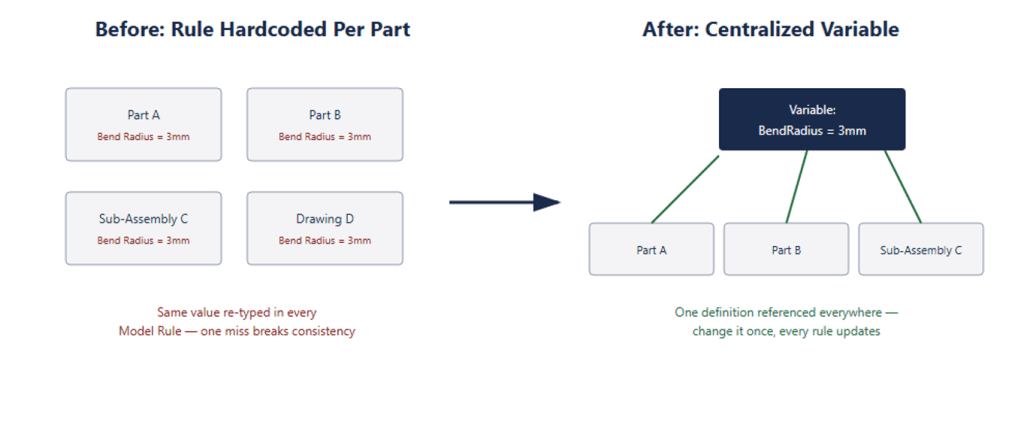
The second structural problem was in how logic had been written. A significant number of rules had been hardcoded directly into individual Model Rules, repeated wherever the same value or logic was needed, rather than defined once as a Variable and referenced everywhere that value applied.
DriveWorks’ own documentation is explicit that Variables exist precisely to avoid this: to let a rule be defined once and reused in multiple places, so that a single change updates every rule that depends on it, and to keep individual rules from becoming so long and deeply nested that they’re difficult to read or debug. In the inherited DriveWorks project, the opposite pattern had taken hold — the same logic duplicated across multiple parts and assemblies, meaning a single required change had to be located and re-applied in every place it had been copied, with a high risk of missed instances and inconsistent output.
We restructured the project’s logic around centralized Variables wherever rules were shared across multiple components, rather than repeated inline, reducing both the maintenance burden and the risk of the exact kind of silent inconsistency that had been generating faulty output for two years.
Rebuilding the CAD Models for Reliable Automation
The most substantial part of the project was a full CAD redesign — the piece of this DriveWorks CAD automation rebuild that took the largest share of the engagement. The originally captured SOLIDWORKS models had not been built with automation as a first principle. Sketches and features were largely referenced to geometry and edges rather than to construction planes — a known automation risk, since DriveWorks’ own best-practice guidance is clear that sketch relations applied to geometry rather than planes are liable to produce dangling dimensions and broken relations the moment an upstream feature changes, silently breaking the automation that depends on them.
The client also needed far more granular control over sheet metal-specific parameters than the existing models allowed — including bend angle, gap distance, and bend radius — none of which were reliably exposed as controllable, captured parameters in the original models.
We rebuilt the part, sub-assembly, top-level assembly, and drawing structure from the ground up, recapturing models with plane-driven automation logic throughout so that DriveWorks rules could reliably drive geometry without the fragile, edge-dependent references that had caused so many of the reported issues. As part of this rebuild, we also integrated automatic weight and costing calculations, generated from the actual components used in a given configuration and their sheet metal flat pattern sizes — a capability the company’s director specifically prioritized, since accurate costing directly informed quoting.
We also built a process to automatically prepare generated sheet metal components for nesting ahead of laser cutting. This was developed as a custom integration on top of the rebuilt DriveWorks project — DriveWorks does not include sheet metal nesting as a native out-of-the-box feature, so this was engineered specifically for this client’s fabrication workflow, connecting DriveWorks’ generated flat pattern outputs into their cutting process.
Resolving Every Reported Issue — and the Ones Nobody Had Reported
Every issue the client’s design team had originally reported was resolved. In the course of the system analysis and rebuild, our team also uncovered a number of additional defects the client hadn’t flagged, which were fixed as part of the same engagement rather than left for a future project.
Some teething issues did surface during deployment to the client’s live server — this is normal for a project of this scope moving from development into production use — and our team resolved these in a timely manner as part of go-live support, rather than treating deployment as the end of the engagement.
The Result — DriveWorks Live and Autopilot in Production
The finished project now runs on DriveWorks Live, fully hosted on the company’s own internal server, which allows multiple departments to use the configurator concurrently rather than being limited to a single desktop installation. It’s paired with DriveWorks Autopilot, which handles unattended, automatic generation of models and documentation from specifications created in DriveWorks Live — meaning design outputs are produced without an engineer manually driving DriveWorks Administrator for every order.
Where the client had spent two years manually redesigning products because their DriveWorks configurator couldn’t be trusted, they now have a documented, maintainable system built on a form structure their own team can safely extend, a rules structure built on shared Variables instead of duplicated logic, and a CAD foundation designed for automation from the plane up.
Inherited a DriveWorks Project You Don't Fully Understand?
A DriveWorks project that grew for years without documentation, built by someone who has since left the business, is one of the more common situations we’re asked to help with — not because DriveWorks itself is unreliable, but because design automation logic built incrementally, under time pressure, without a second person reviewing it, tends to accumulate exactly this kind of technical debt.
If your team has an inherited DriveWorks project Pro or DriveWorks Solo project you don’t have full visibility into, or you’re dealing with unexplained bugs in generated models, drawings, or documentation, our team can carry out the same kind of system analysis, UI redesign, and CAD rebuild process described in this case study. As a DriveWorks consultant working with manufacturers across the UK, this kind of DriveWorks project rework is exactly the engagement we’re set up for. Get in touch with JOA Designs to talk about your project.